
Why Ericom AccessNow Users Are Moving to DartRelay, and How to Move Without Changing Your Applications
For more than a decade, Ericom AccessNow has been the way many organisations put Windows applications in a browser. Plenty of line-of-business programs were even adapted to it: they call Ericom's anfiletransfer.exe to send a report to the user or to collect a file from their computer, and they print through AccessNow's browser printing.
Those organisations now have a decision to make. This article explains where Ericom stands today, why AccessNow customers are choosing DartRelay, and how the move works in practice: side by side, on the servers you already have, with no changes to your applications.
Where Ericom AccessNow stands
Ericom Software was bought by Cradlepoint, part of Ericsson, in April 2023. The stated aim was its cloud security platform, which became part of Cradlepoint's SASE and zero-trust offering. The company's attention has followed that direction since.
| Date | What happened |
|---|---|
| April 2023 | Cradlepoint (Ericsson) acquires Ericom for its cloud security technology. |
| March 2025 | AccessNow 11.1 is released. Ericom announces end of life for all PowerTerm products, with support ending on 30 June 2027. |
| 22 March 2028 | End of support for AccessNow 11.1 and Ericom Connect 11.1, as listed by Ericom's Japanese distributor under the new three-year support policy. |
AccessNow still works, and nobody has to move tomorrow. But a remote access platform is something you live with for years, and the questions customers ask us are practical ones: how long will it be supported, who will fix the next browser change, and what happens to the applications we adapted for it? That is where DartRelay comes in.
Why AccessNow users choose DartRelay
1. Faster: applications open quicker than with Ericom
Speed is the first thing people notice. An Ericom AccessNow customer who moved to DartRelay confirmed that their applications launch far quicker than they did with Ericom, on the same session hosts. Once open, screens redraw quickly, scrolling keeps up and typing feels local. DartRelay can also stream moving pictures to the browser as H.264 video, for smoother video, 3D and scrolling on less bandwidth.
2. Legacy applications run as they are
With DartRelay, an ordinary Windows program needs no changes to work well in a browser:
- Files. When the program shows its own Open or Save As dialog, the browser takes over: Open goes to the user's own file picker, and Save As sends the file to their downloads. No drive mapping, no upload folder, no extra code. See open and save local files from remote apps.
- Printing. Printing is one switch per application, with no printer drivers on your hosts. What the user prints opens their browser's print dialog, so they print to whatever printer is on their desk. For people who print all day, the optional Print Helper sends jobs straight to their printer.
- Launching. Applications are published from the host as they are and open in a browser tab. There is no HTML5 client to embed, no launch parameters to build into your own pages, and nothing to install on the user's device.
3. Applications already adapted for Ericom keep working
If your developers changed a program to work with AccessNow, you do not have to undo that work. DartRelay understands the calls your program already makes, so the program stays exactly as it is.
4. anfiletransfer.exe: no code changes, and a smooth hand-over
Programs written for AccessNow move files by running anfiletransfer.exe: anfiletransfer.exe "report.pdf" to send a file to the user, or anfiletransfer.exe -t 1 ".pdf" C:\Inbox 120 to ask them for one. With Ericom-compatible file transfer switched on for an application group, DartRelay handles those exact commands:
- A download command becomes a browser download. Several files sent close together can arrive as one ZIP, as separate files, or with a question, as you choose.
- An upload command opens the browser's own file picker, limited to the file types the program asked for. The files are written into the folder the program named, and the list of uploaded files is written to the same log file the program already reads.
- The program gets the same exit codes it gets from Ericom: done, cancelled or timed out.
The hand-over is the clever part. While Ericom is still installed on a host, DartRelay uses Ericom's own anfiletransfer.exe: it takes the calls made in DartRelay sessions, and leaves Ericom's own sessions untouched. Once you remove Ericom, DartRelay puts its own compatible anfiletransfer.exe in its place, at the same command name, so the program never notices. There is no day when file transfer stops working.
5. Licensing that follows the pattern you know
If you are used to managing Ericom licences centrally, DartRelay can work the same way. Any DartRelay installation that holds a product key can act as the licence server for the others, across domains, networks and sites. They all draw their seats from one pool over HTTPS, with no domain trust or VPN between them, and keep working for a grace period if the link drops. A Relay Seat is one device with a live session, whatever it opens, which is close to the concurrent-user model many Ericom customers have today.
6. Not just a replacement: the next level for your published applications
Moving because a product is ageing is one reason. The better reason is what you gain:
- Agentless. DartRelay connects to your session hosts over RDP with no agent to install. The one exception is the small Files Agent behind browser file dialogs and Ericom-compatible file transfer, which DartRelay installs and updates on the hosts that use them, by itself.
- Clientless. Users need only a browser: no client app, plug-in or VPN.
- One modern service. The portal, administration and session relay run as one service on Windows or Linux.
- Built-in high availability. Run a pool of servers with the built-in Relay Balancer, or behind NetScaler, F5 BIG-IP or any load balancer.
- Security built in. Two-factor sign-in, picture CAPTCHA and lockout, Microsoft Entra ID and OpenID Connect sign-in, and a full audit log.
- Your brand, many times over. Themes, a page builder, announcements, terms of use and multi-tenancy, with each web address carrying its own brand.
- Kiosks and public apps. Automatic launch rules open the right application the moment someone arrives.
How the move works
You do not need a migration weekend. DartRelay and Ericom AccessNow can run side by side, against the same session hosts, while you move users across at your own pace:
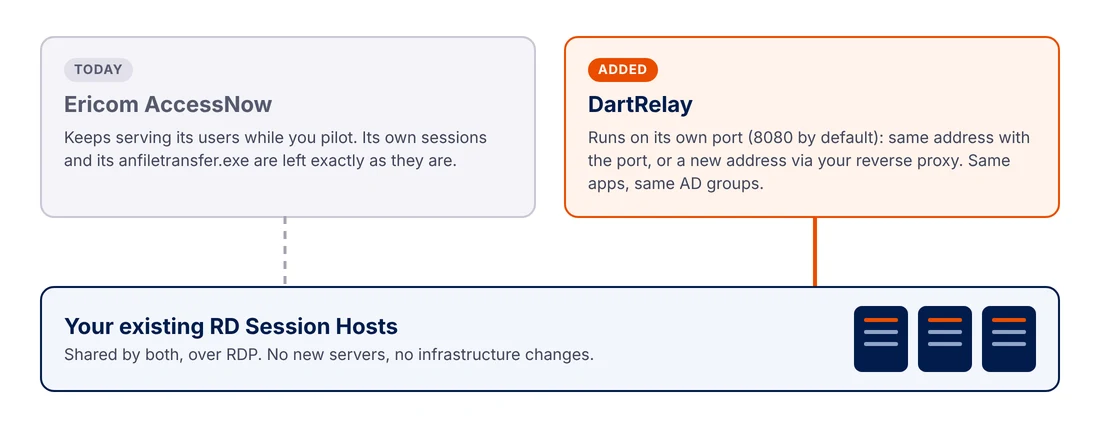
- Install DartRelay on a Windows or Linux server, a new machine or one you already have. It runs on its own port, 8080 by default or any port you choose, so it never gets in Ericom's way.
- Add your existing session hosts, the same ones Ericom uses. Ericom keeps working, and its users notice nothing.
- Publish the same applications to the same Active Directory groups.
- Switch on files and printing. For programs that call
anfiletransfer.exe, tick Ericom-compatible file transfer. - Pilot with a few users while everyone else stays on Ericom.
- Move everyone across by pointing your links or DNS name at DartRelay.
- Retire Ericom when you are ready, then let DartRelay install its own
anfiletransfer.exeon each host.
Because DartRelay listens on its own port, people can reach it in either of two ways while Ericom carries on: at the address they already use with DartRelay's port added (for example https://apps.example.com:8080), or at a separate public address, such as https://portal.example.com, published through your reverse proxy. Either way, Ericom and DartRelay run in parallel until you are ready to switch Ericom off.
No infrastructure changes, no application changes, and a way back at every step until the last one. The full checklist is in the DartRelay documentation: Simple steps to move from Ericom AccessNow to DartRelay.
Need a hand?
We have built and supported Ericom, Citrix and Microsoft remote access portals for years, and we build DartRelay. Talk to our engineers about your move, or try the 30-day DartRelay free trial alongside your Ericom servers.