
Best Citrix Alternative in 2026: Why Teams Are Moving to DartRelay
For more than a decade our engineers have designed Citrix StoreFront and NetScaler Gateway portals for organisations around the world. We know Citrix well, and we still respect what it does. But over the last few years the conversations we have with customers have changed. The question used to be "how can we make our Citrix portal look like our brand?" Now it is more often "is there something simpler and more affordable that does what we actually use Citrix for?"
This article looks at why so many teams are searching for a Citrix alternative in 2026, what to look for in one, and why we built DartRelay to answer exactly that question.
Why organisations are looking beyond Citrix
Most of the teams we speak to are not unhappy with the user experience. Their concerns are about cost, complexity and control.
- Licensing and renewals. Since the Cloud Software Group acquisition, Citrix licensing has moved firmly towards subscription bundles, and many customers tell us their renewal quotes have risen sharply, often for features they never switched on.
- Infrastructure overhead. A typical Citrix Virtual Apps and Desktops site needs Delivery Controllers, StoreFront, a licence server, a SQL database and NetScaler Gateway for remote access, plus a Virtual Delivery Agent (VDA) installed and maintained on every host. Each layer has its own updates, versions and compatibility rules.
- Specialist skills. Keeping all of that healthy takes experienced Citrix administrators. Smaller IT teams find that a large share of their time goes into the platform itself rather than the applications users need.
- Files and printers are still fiddly. Getting a document from a user's laptop into a published application, and a report back out to their own printer, usually depends on client drive mapping, printer redirection and driver management, all of which assume the full Workspace app on a managed device.
- Branding takes effort. We have built hundreds of custom StoreFront and NetScaler themes, and they work well, but every major upgrade means the customization has to be reviewed again.
For a large enterprise with thousands of users and complex HDX requirements, Citrix can still be the right choice. For a small or mid-sized business, a managed service provider, or a department that simply needs to publish a handful of Windows applications securely, it is often far more platform than the job requires.
What a good Citrix alternative should offer
When we evaluate alternatives with customers, we use a short checklist:
- Browser-based access to published applications and full desktops, with nothing to install on users' devices.
- Little or nothing to install on your hosts, so publishing a new server does not mean deploying and patching another agent.
- Files and printing that feel local: users should open and save files on their own computer and print to their own printer, without drives, drivers or a client app.
- Strong security built in: two-factor authentication, sign-in protection, session timeouts and an audit log, without buying extra modules.
- Real branding: your logo, colours and sign-in page, not just a logo upload.
- Transparent pricing that you can work out yourself before you speak to a sales team.
- Self-hosting, so your data, credentials and sessions stay on your own infrastructure.
The alternatives in brief
There are several capable products on the market, and each suits a different situation:
- Microsoft Remote Desktop Services with RD Web Client is included with Windows Server and needs no host agent, but you still deploy the Gateway, Broker, Web Access and licensing roles, buy RDS CALs, and branding options are very limited. (We customize it for exactly that reason; see our RD Web Client customization.)
- Parallels RAS is a full-featured platform that many Citrix customers consider. It installs its own agent on each RD Session Host and has its own set of gateway and broker components.
- VMware Horizon (now Omnissa) is aimed at large VDI estates and uses the Horizon Agent on every virtual machine.
- Azure Virtual Desktop is a good fit if you want Microsoft to host the control plane, but your session hosts live in Azure and each one runs the AVD agent.
DartRelay: a self-hosted, agentless Citrix alternative
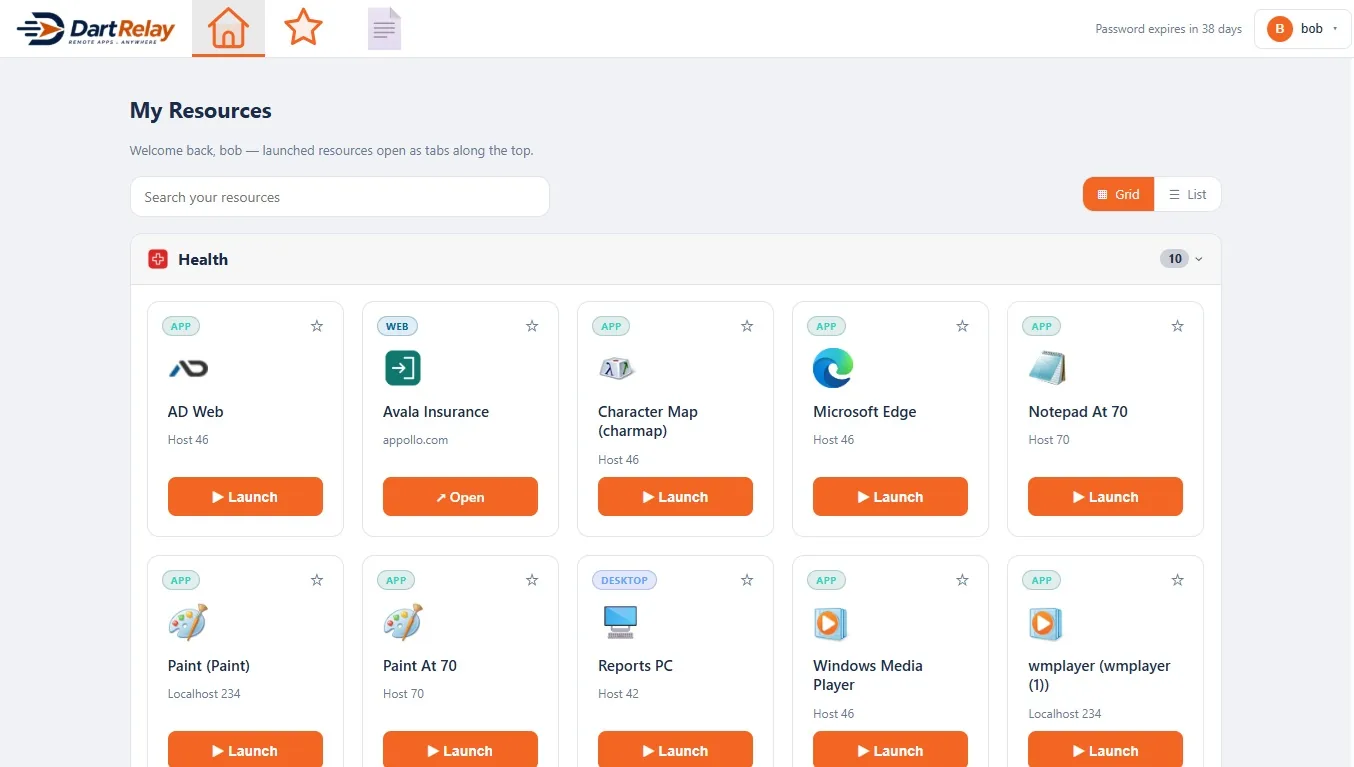
DartRelay is our own answer to that checklist. It delivers your applications and desktops to any modern browser, from one server that you install and own.
Nothing installed on your hosts
DartRelay is agentless. The DartRelay server connects to your existing Windows desktops and Windows Servers over RDP, the same protocol the Remote Desktop client uses, and streams each session to the browser over HTTPS and a secure WebSocket. There is no VDA or host agent for you to deploy, upgrade or troubleshoot. DartRelay can even install the Remote Desktop Session Host role on a server for you. (The one optional helper, a small Files Agent used for native file dialogs, is deployed and kept up to date by DartRelay itself, only on hosts that use that feature.)
One server, not a stack
The user portal, the administrator console and the session relay all run on the DartRelay server, which can be Windows or Linux. A small installation keeps its settings in a single SQLite file; larger ones can use SQL Server, MySQL or PostgreSQL. Only one web port needs to be reachable from outside, so there is no separate gateway product to buy.
Security included
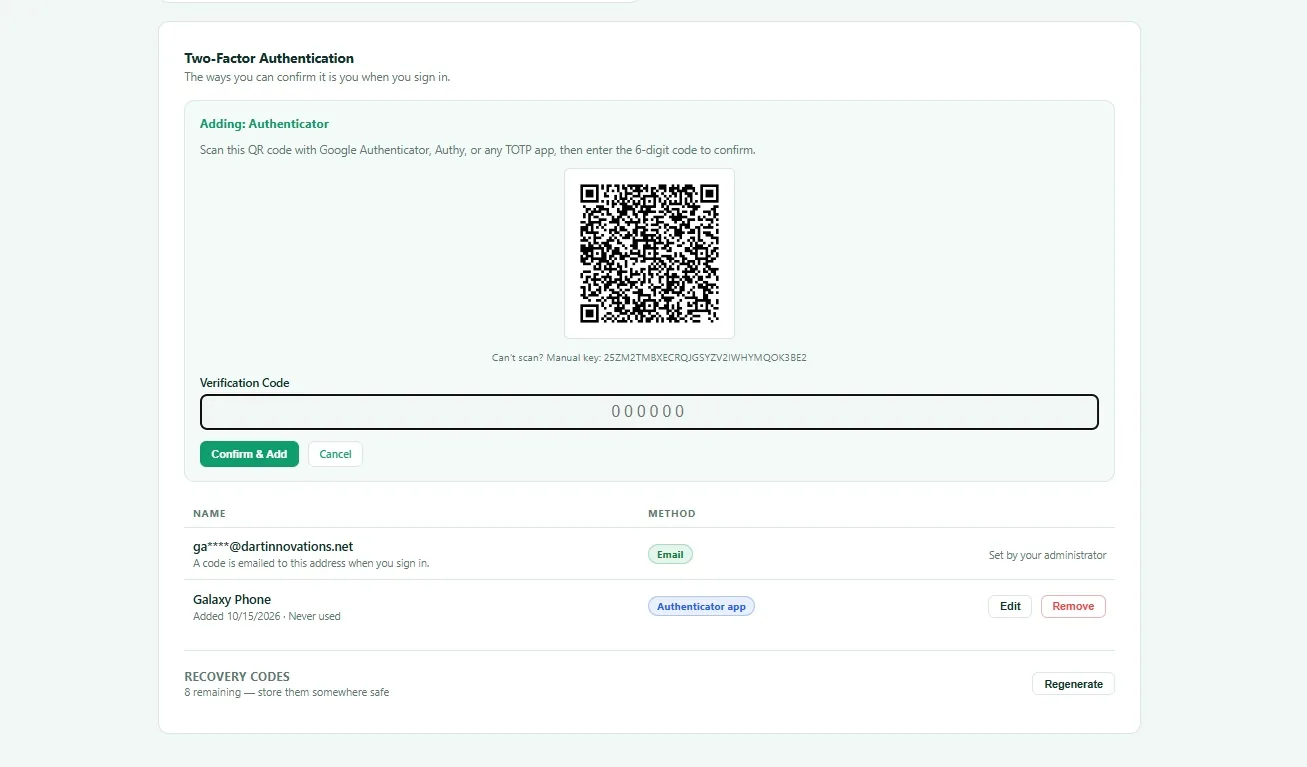
Two-factor authentication, picture CAPTCHA, sign-in lockout, password policies, session lifetimes and idle timeouts, administrator roles and a full audit log are all part of the product. Windows passwords are handled on the server and never reach the browser.
Everything users expect
Users get a clean catalogue of their applications and desktops with favourites, search and categories. Each application opens in its own tab, and web applications can sit in the same catalogue alongside published Windows apps.
Your own file browser, inside any remote app
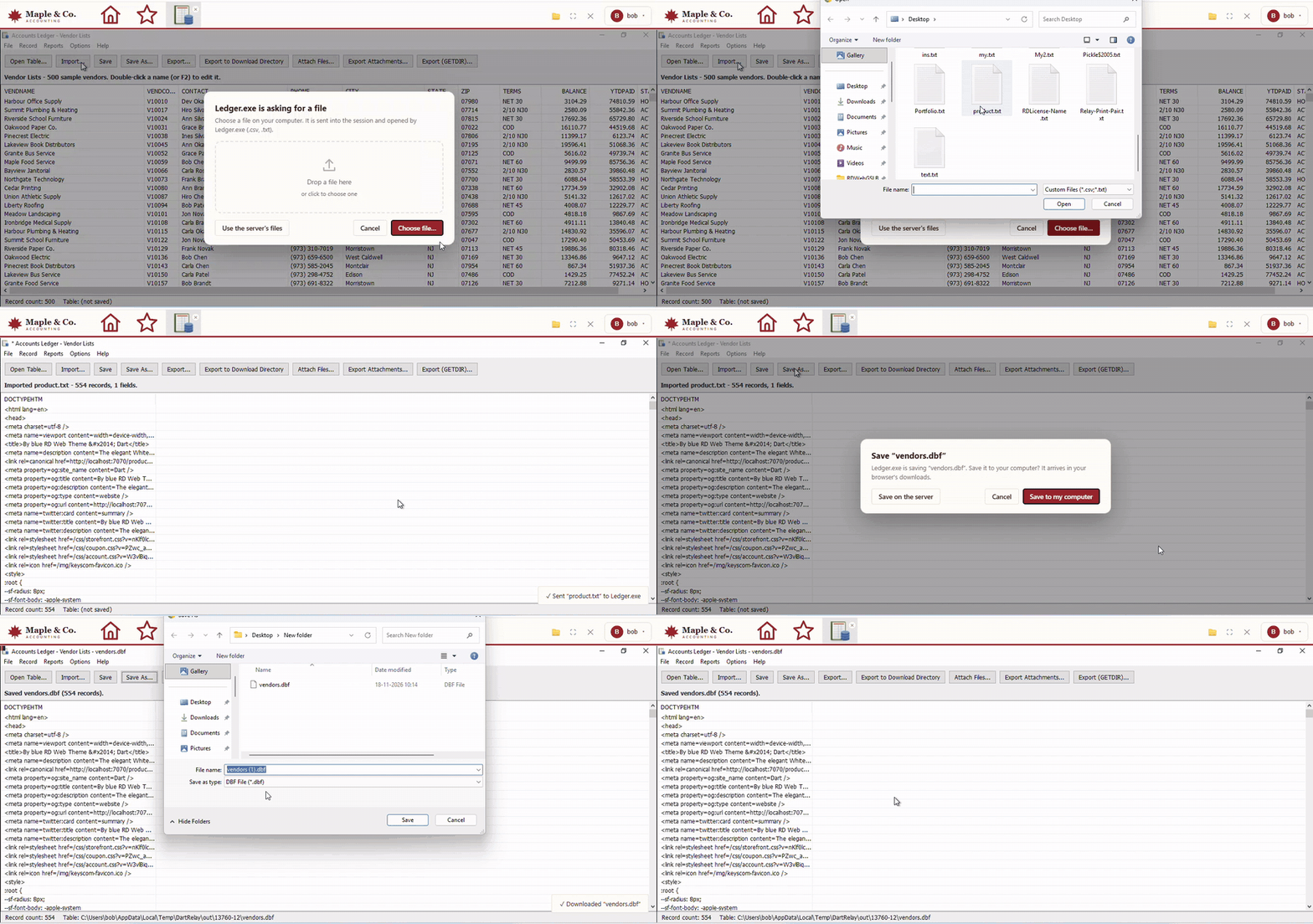
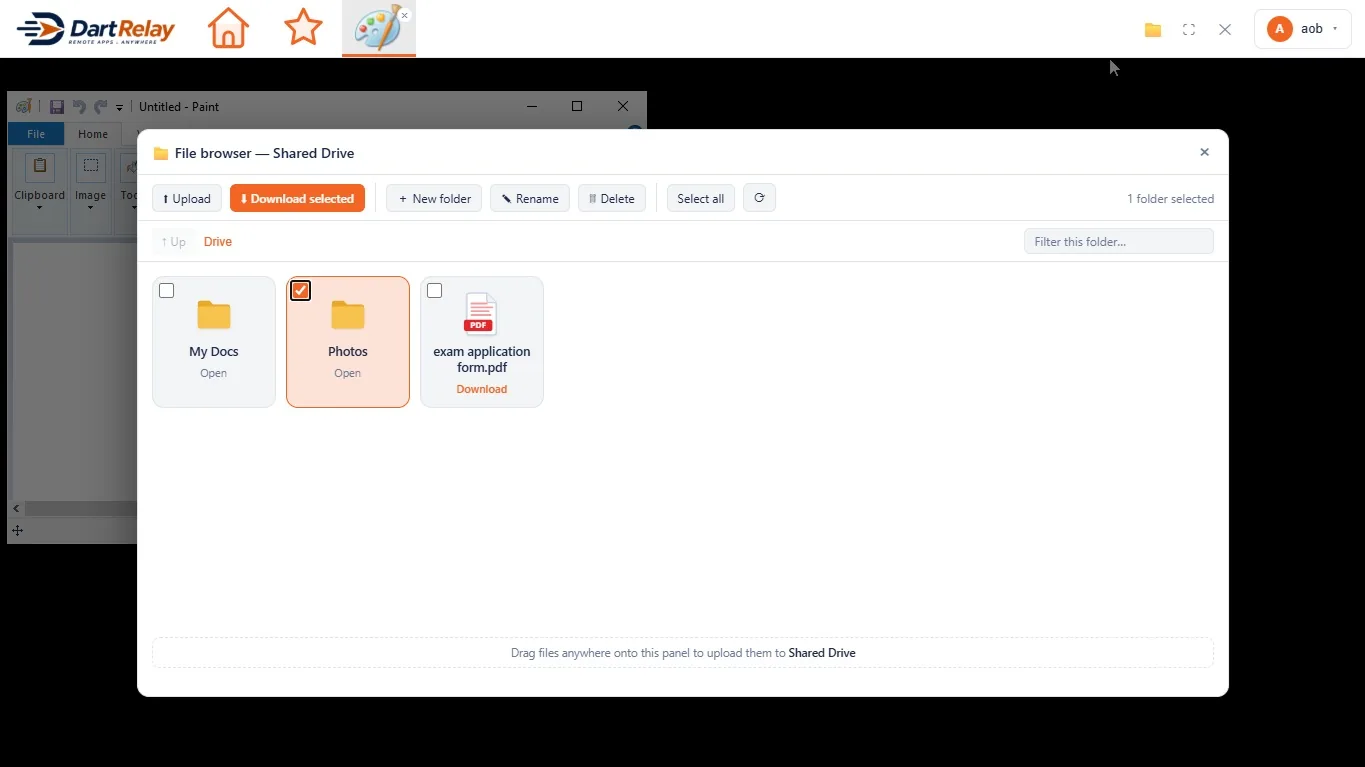
This is where DartRelay goes further than any browser-based platform we know. When a published program shows its Windows Open or Save As dialog, DartRelay hands it to the browser: the user picks the file in their own computer's native file browser, and what the program saves arrives in their Downloads. No upload folder, no mapped drive, no client app, and no change to the application.
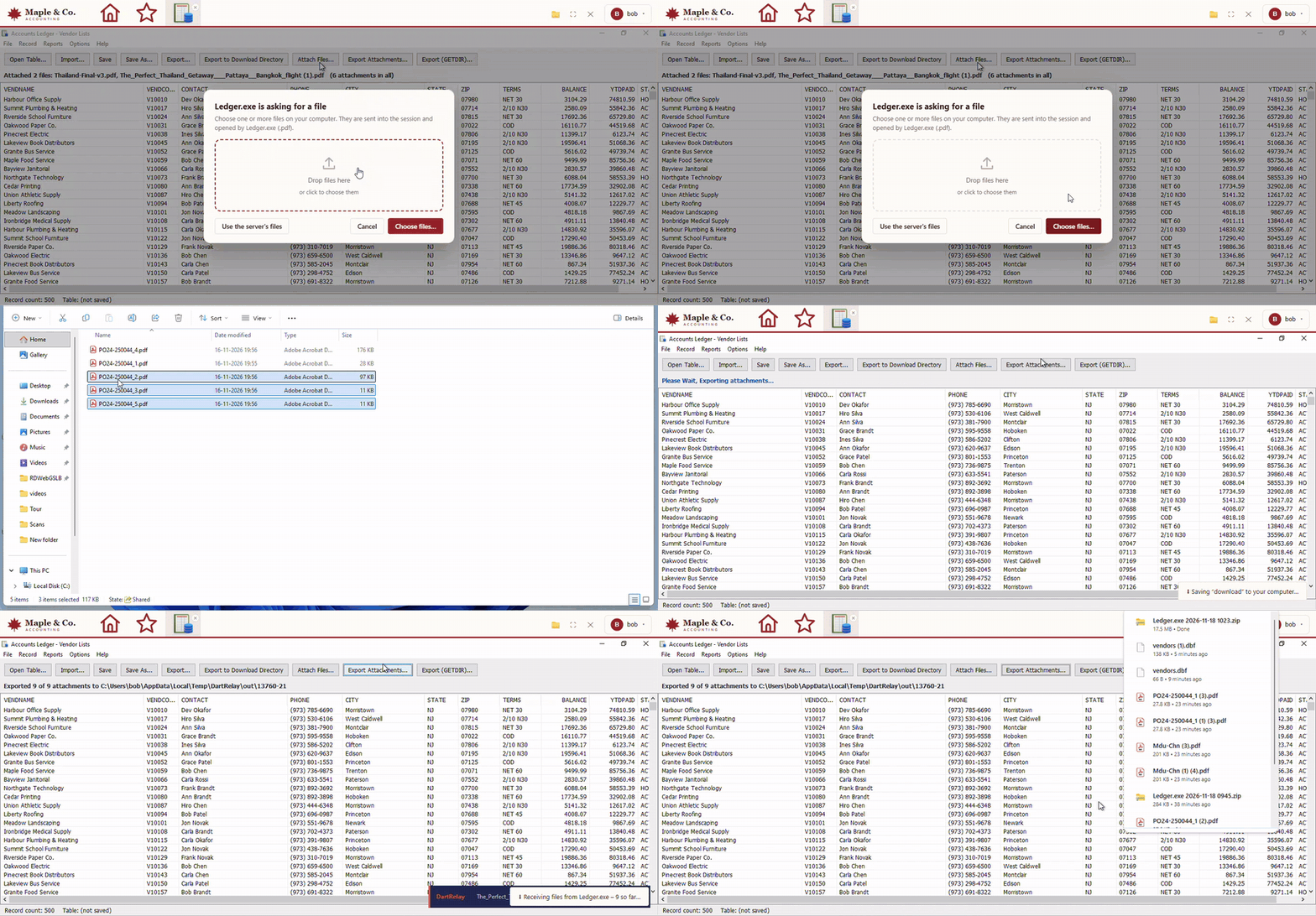
- Several files at once wherever the program's own dialog allows a multiple selection: Attach Files, Import, Add documents.
- Folder exports, including the classic Browse For Folder dialog of Visual FoxPro and other legacy programs. The administrator decides whether the files arrive as one ZIP, as separate downloads, or with a choice each time.
- Save changes back. Edit a file opened from the PC, press Save, and DartRelay offers the updated copy back.
- A session file browser as well, for bulk transfers: upload, download, rename and organise files in a private folder.
Print to the printer on the desk
Printing needs no drivers on the host and no printer redirection. A DartRelay virtual printer appears in the session, under any name your application expects. When a user prints, the document comes back to their browser and the browser's own print dialog opens, so they print to whatever printer their computer can reach: office, home or label printer. For people who print receipts or labels all day, the optional DartRelay Print Helper sends each job straight to their chosen printer with no dialog at all, and IT can push it silently.
Branding with no limits
This is where our CIS background shows. DartRelay ships with a range of ready-made themes and a block editor for the sign-in and home pages, so you can match your brand without writing code. If you want something unique, our team can design a custom DartRelay theme for you.

Pricing you can read
Every DartRelay licence includes every feature. At the time of writing, a base licence is $300 a year including 5 Relay Seats, and each additional seat is $15 a year. There are no editions, no add-on modules and no per-feature upsells.
Citrix and DartRelay side by side
| Typical Citrix site | DartRelay | |
|---|---|---|
| Software on each host | Virtual Delivery Agent | None (agentless, over RDP) |
| Core components | Delivery Controller, StoreFront, licence server, SQL, NetScaler Gateway | One DartRelay server and a database |
| User access | Workspace app or browser | Any modern browser |
| Opening and saving local files | Client drive mapping in the Workspace app; upload and download in the browser client | The user's own file browser, straight from File → Open and Save As |
| Printing to local printers | Printer redirection and print drivers | Browser print dialog or Print Helper, no drivers on hosts |
| Two-factor authentication | Usually through NetScaler or a third party | Built in |
| Branding | Theme customization per version | Themes and page builder included |
| Pricing | Quote-based subscription bundles | Published price, all features in every licence |
Moving from Citrix to DartRelay
Because DartRelay connects to your hosts over RDP, a migration does not have to be a big-bang project. You can install DartRelay next to your current Citrix site, point it at the same session hosts, publish the applications your users need and let a pilot group try it. Once they are happy, you move the rest of your users across and retire the Citrix components at your own pace.
Our engineers have spent years inside Citrix environments, so we can help you plan the move, recreate your branding in DartRelay and support you after go-live.
Try it for yourself
The best way to judge any Citrix alternative is to publish your own applications on it. DartRelay comes with a 30-day free trial, with every feature switched on. If you would like a walkthrough first, talk to our team.